
AI-Assisted go-zero Development
import { Card, CardGrid, Aside } from ‘@astrojs/starlight/components’;
In the AI-assisted coding era, how do you make your AI coding assistant truly understand your framework and generate spec-compliant code? The go-zero team has built a complete AI tooling ecosystem around three projects:
How They Work Together
Section titled “How They Work Together”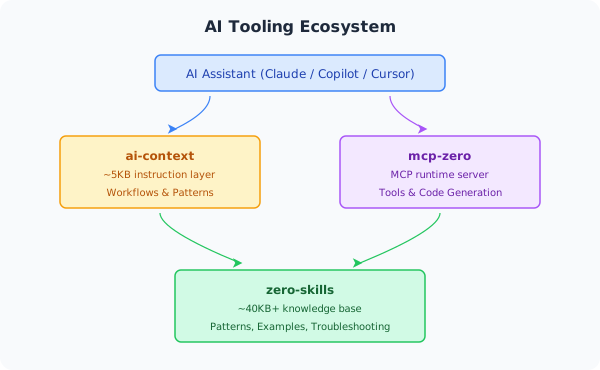
Example: Create a REST API
- AI reads
ai-context→ learns to usecreate_api_servicetool - AI calls
mcp-zero→ generates the project structure - AI references
zero-skills→ produces Handler/Logic/Model code following go-zero conventions
Setup by Tool
Section titled “Setup by Tool”GitHub Copilot
Section titled “GitHub Copilot”# Add ai-context as a submodule (tracks upstream updates automatically)git submodule add https://github.com/zeromicro/ai-context.git .github/ai-context
# Create symlink for Copilotln -s ai-context/00-instructions.md .github/copilot-instructions.md
# Update to latestgit submodule update --remote .github/ai-contextCursor
Section titled “Cursor”git submodule add https://github.com/zeromicro/ai-context.git .cursorrulesgit submodule update --remote .cursorrulesCursor auto-reads all .md files in .cursorrules/ as project rules.
Windsurf (Codeium)
Section titled “Windsurf (Codeium)”git submodule add https://github.com/zeromicro/ai-context.git .windsurfrulesgit submodule update --remote .windsurfrulesClaude Desktop + mcp-zero
Section titled “Claude Desktop + mcp-zero”1. Build mcp-zero:
git clone https://github.com/zeromicro/mcp-zero.gitcd mcp-zerogo build -o mcp-zero main.go2. Configure Claude Desktop (~/Library/Application Support/Claude/claude_desktop_config.json on macOS):
{ "mcpServers": { "mcp-zero": { "command": "/path/to/mcp-zero", "env": { "GOCTL_PATH": "/Users/yourname/go/bin/goctl" } } }}3. Restart Claude Desktop. Claude will now use mcp-zero tools to generate go-zero code.
Claude Code (CLI)
Section titled “Claude Code (CLI)”claude mcp add \ --transport stdio \ mcp-zero \ --env GOCTL_PATH=/Users/yourname/go/bin/goctl \ -- /path/to/mcp-zero
claude mcp list # verifyProject Descriptions
Section titled “Project Descriptions”ai-context
Section titled “ai-context”Repo: https://github.com/zeromicro/ai-context
A lightweight instruction file (~5KB) that provides:
- Workflows: When to use which tool
- Tool usage: How to call mcp-zero
- Quick patterns: Short code snippets for common tasks
Example decision tree from ai-context:
User Request →├─ New API? → create_api_service → generate_api_from_spec├─ New RPC? → create_rpc_service├─ Database? → generate_model└─ Modify? → Edit .api → generate_api_from_speczero-skills
Section titled “zero-skills”Repo: https://github.com/zeromicro/zero-skills
A comprehensive knowledge base (~40KB+):
- Patterns: REST API, RPC, database, resilience
- Best practices: Production-grade code standards with ✅ correct vs ❌ common mistakes
- Troubleshooting: Solutions to frequent issues
- Getting started: End-to-end examples
mcp-zero
Section titled “mcp-zero”Repo: https://github.com/zeromicro/mcp-zero
A Model Context Protocol server with 10+ tools:
- Create API / RPC services
- Generate model code from SQL
- Validate
.apispecs and.protodefinitions - Query go-zero documentation
- Analyze existing project structure
Before vs After
Section titled “Before vs After”Without the AI tool ecosystem:
Developer: Create a user API
AI: Here's a basic HTTP handler...[generates generic Go HTTP code, not go-zero conventions]
Developer: That's not how go-zero works — handlers should call the logic layer
AI: Sorry, here's the updated code...[multiple rounds needed to get correct code]
With the AI tool ecosystem:
Developer: Create a user API
AI: I'll follow go-zero's three-layer architecture...[immediately generates correct Handler → Logic → Model structure][includes proper error handling, context propagation, validation]
Developer: Perfect! ✅
Design Principles
Section titled “Design Principles”| Principle | Benefit |
|---|---|
| Layered — ai-context (5KB) for speed, zero-skills (40KB+) for depth | Fast responses + deep knowledge |
| Single source of truth — zero-skills is the canonical reference | Update once, affects all tools |
| AI-optimized structure — ✅/❌ examples, structured Markdown | Better AI parsing and output |
| Full lifecycle coverage | Create → generate → debug → optimize |