Cron Jobs on Kubernetes
Overview
Section titled “Overview”With regard to scheduled tasks, there are a variety of options such as third-party packages, server cron, k8s cronjob, where only k8s cronjob, others can learn from the relevant third-party package information themselves.
2. Project address
Section titled “2. Project address”Project address:https://github.com/Mikaelemmm/zerok8scron
We’ve integrated cobra,k8s cronjob directly executes job name at each schedule
3. Key code analysis
Section titled “3. Key code analysis”package main
import ( "zerok8scron/internal/cmd")
func main() { cmd.Execute()}package cmd
import ( "github.com/spf13/cobra" "github.com/zeromicro/go-zero/core/conf" "os" "zerok8scron/internal/config" "zerok8scron/internal/logic" "zerok8scron/internal/svc")
const ( codeFailure = 1)
var ( confPath string
rootCmd = &cobra.Command{ Use: "cron", Short: "exec cron job", Long: "exec cron job", }
// all job ... helloJob = &cobra.Command{ Use: "hello", Short: "print 'hello SvcName' once per minute", RunE: logic.Hello, }
// add more job , wait for you.....)
// Execute executes the given commandfunc Execute() { if err := rootCmd.Execute(); err != nil { os.Exit(codeFailure) }}
func init() {
// init config cobra.OnInitialize(initConfig) rootCmd.PersistentFlags().StringVar(&confPath, "config", "etc/cron.yaml", "config file (default is $HOME/.cobra.yaml)")
// add subcommand rootCmd.AddCommand(helloJob)}
func initConfig() { var c config.Config conf.MustLoad(confPath, &c) svc.InitSvcCtx(c)}package logic
import ( "fmt" "github.com/spf13/cobra" "zerok8scron/internal/svc")
// Hello print "hello SvcName" once per minutefunc Hello(_ *cobra.Command, _ []string) error {
fmt.Printf("srvName : %s , hello \n", svc.GetSvcCtx().Config.Name)
return nil}3.1 Implementation schedule
Section titled “3.1 Implementation schedule”It can be seen that rootCmd is the primary command, helloJob is one of our own tasks to schedule, and the method to be executed after the scheduler is the method in the logo.go.
If more tasks need to be added, we will continue to add them directly below and add a corresponding implementation in the logic.
3.2 How to initialize configuration
Section titled “3.2 How to initialize configuration”We initialized the configuration before executing it, see that you may be familiar here. We place the initialization configuration of the go-zero default in the main configuration here
We use the default profile as etc/cron.yaml
4. Operational schedule
Section titled “4. Operational schedule”4.1 Local execution once
Section titled “4.1 Local execution once”$ go run main.go hello4.2 Executed once in docker
Section titled “4.2 Executed once in docker”$ goctl docker -go main.go #创建dockerfile,如果你用上面的项目,项目中已经创建好可以省略$ docker build -t zerok8scron:v1 . # 构建镜像,如果你用上面的项目,项目中已经创建好可以省略$ docker run zerok8scron:v1 hello #运行即可4.3 k8s with cronjob scheduling once a minute
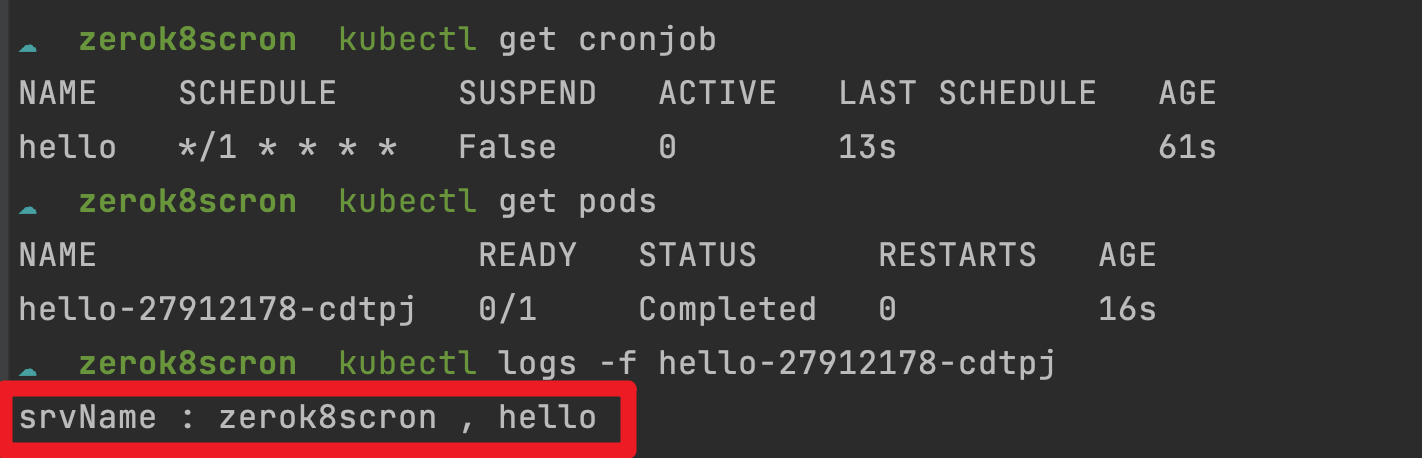
Section titled “4.3 k8s with cronjob scheduling once a minute”apiVersion: batch/v1kind: CronJobmetadata: name: hellospec: schedule: "*/1 * * * *" jobTemplate: spec: template: spec: containers: - name: hello image: zerok8scron:v1 args: - hello restartPolicy: OnFailureRun
$ kubectl apply -f cronjob.yamlThen you can view the cronjob state and output