
AI 辅助 go-zero 开发
import { Card, CardGrid, Aside } from ‘@astrojs/starlight/components’;
在 AI 辅助编程时代,如何让大模型真正理解你使用的框架,生成符合框架规范的代码?go-zero 团队构建了一套完整的 AI 工具生态,包括 ai-context、zero-skills 和 mcp-zero 三个项目,让 Claude、GitHub Copilot、Cursor 等 AI 编程助手成为你的 go-zero 专家。
协同工作原理
Section titled “协同工作原理”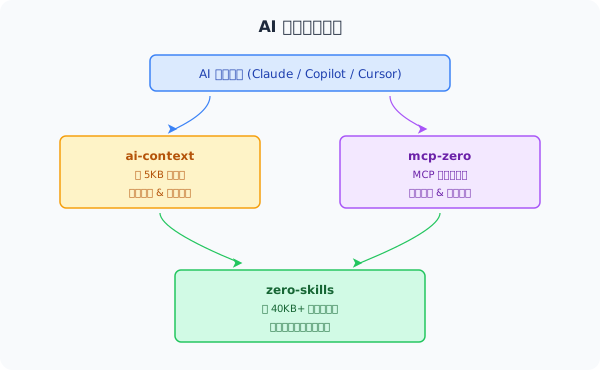
示例:创建新的 REST API
- AI 读取
ai-context→ 了解应该用create_api_service工具 - AI 调用
mcp-zero→ 执行代码生成,创建项目结构 - AI 参考
zero-skills→ 生成符合 Handler/Logic/Model 三层架构的完整实现
各工具配置方式
Section titled “各工具配置方式”GitHub Copilot
Section titled “GitHub Copilot”# 添加 ai-context 作为 submodule(自动跟踪上游更新)git submodule add https://github.com/zeromicro/ai-context.git .github/ai-context
# 创建符号链接ln -s ai-context/00-instructions.md .github/copilot-instructions.md
# 更新到最新版本git submodule update --remote .github/ai-contextCursor
Section titled “Cursor”git submodule add https://github.com/zeromicro/ai-context.git .cursorrulesgit submodule update --remote .cursorrulesCursor 会自动读取 .cursorrules 目录下的所有 .md 文件作为项目规则。
Windsurf (Codeium)
Section titled “Windsurf (Codeium)”git submodule add https://github.com/zeromicro/ai-context.git .windsurfrulesgit submodule update --remote .windsurfrulesClaude Desktop + mcp-zero
Section titled “Claude Desktop + mcp-zero”1. 安装 mcp-zero:
git clone https://github.com/zeromicro/mcp-zero.gitcd mcp-zerogo build -o mcp-zero main.go2. 配置 Claude Desktop(macOS:~/Library/Application Support/Claude/claude_desktop_config.json):
{ "mcpServers": { "mcp-zero": { "command": "/path/to/mcp-zero", "env": { "GOCTL_PATH": "/Users/yourname/go/bin/goctl" } } }}3. 重启 Claude Desktop,开始使用。
Claude Code(命令行)
Section titled “Claude Code(命令行)”claude mcp add \ --transport stdio \ mcp-zero \ --env GOCTL_PATH=/Users/yourname/go/bin/goctl \ -- /path/to/mcp-zero
claude mcp list # 验证配置三大项目详解
Section titled “三大项目详解”ai-context
Section titled “ai-context”仓库:https://github.com/zeromicro/ai-context
轻量级指令文件(约 5KB),提供:
- 工作流程:何时使用哪个工具
- 工具使用:如何调用 mcp-zero
- 快速模式:常见任务的快速代码片段
ai-context 中的决策树示例:
User Request →├─ New API? → create_api_service → generate_api_from_spec├─ New RPC? → create_rpc_service├─ Database? → generate_model└─ Modify? → Edit .api → generate_api_from_speczero-skills
Section titled “zero-skills”仓库:https://github.com/zeromicro/zero-skills
详细知识库(约 40KB+):
- 详细模式:REST API、RPC、数据库、弹性保护
- 最佳实践:生产级代码规范,含 ✅ 正确做法 + ❌ 错误做法对比
- 故障排查:常见问题解决方案
- 快速开始:从零到一的完整示例
mcp-zero
Section titled “mcp-zero”仓库:https://github.com/zeromicro/mcp-zero
基于 Model Context Protocol 的工具服务,提供 10+ 个工具:
- 创建 API/RPC 服务
- 从 SQL 生成 model 代码
- 验证
.apispec 和.proto定义 - 查询 go-zero 文档
- 分析现有项目结构
使用前后对比
Section titled “使用前后对比”没有 go-zero AI 工具生态:
开发者:创建一个用户 API
AI:好的,这是基本的 HTTP handler...[生成通用的 Go HTTP 代码,不符合 go-zero 规范]
开发者:这不是 go-zero 的写法,handler 应该调用 logic 层
AI:抱歉,这是修改后的代码...[多轮对话才能得到正确的代码]
使用 go-zero AI 工具生态:
开发者:创建一个用户 API
AI:好的,我将按照 go-zero 的三层架构创建...[直接生成符合规范的 Handler → Logic → Model 代码][包含正确的错误处理、上下文传递、数据验证]
开发者:完美!✅
核心设计理念
Section titled “核心设计理念”| 设计原则 | 优势 |
|---|---|
| 分层设计 — ai-context(5KB)快速加载,zero-skills(40KB+)深度学习 | 快速响应 + 深度知识 |
| 单一数据源 — zero-skills 是规范的权威来源 | 一处更新,全局生效 |
| AI 优化的内容组织 — ✅/❌ 示例, 结构化 Markdown | AI 更易解析和输出 |
| 覆盖完整开发周期 | 创建 → 生成 → 调试 → 优化 |