Kubernetes 定时任务
关于定时任务,有多种不同方案,比如第三方包、服务器 cron、k8s cronjob,这里只讲解 k8s cronjob,其他的可以去看相关第三方包资料自行学习
2、项目地址
Section titled “2、项目地址”项目地址:https://github.com/Mikaelemmmm/zerok8scron
我们在项目中集成了 cobra,k8s cronjob 在每次调度的时候直接执行对应 job name 即可
3、关键代码分析
Section titled “3、关键代码分析”package main
import ( "zerok8scron/internal/cmd")
func main() { cmd.Execute()}package cmd
import ( "github.com/spf13/cobra" "github.com/zeromicro/go-zero/core/conf" "os" "zerok8scron/internal/config" "zerok8scron/internal/logic" "zerok8scron/internal/svc")
const ( codeFailure = 1)
var ( confPath string
rootCmd = &cobra.Command{ Use: "cron", Short: "exec cron job", Long: "exec cron job", }
// all job ... helloJob = &cobra.Command{ Use: "hello", Short: "print 'hello SvcName' once per minute", RunE: logic.Hello, }
// add more job , wait for you.....)
// Execute executes the given commandfunc Execute() { if err := rootCmd.Execute(); err != nil { os.Exit(codeFailure) }}
func init() {
// init config cobra.OnInitialize(initConfig) rootCmd.PersistentFlags().StringVar(&confPath, "config", "etc/cron.yaml", "config file (default is $HOME/.cobra.yaml)")
// add subcommand rootCmd.AddCommand(helloJob)}
func initConfig() { var c config.Config conf.MustLoad(confPath, &c) svc.InitSvcCtx(c)}package logic
import ( "fmt" "github.com/spf13/cobra" "zerok8scron/internal/svc")
// Hello print "hello SvcName" once per minutefunc Hello(_ *cobra.Command, _ []string) error {
fmt.Printf("srvName : %s , hello \n", svc.GetSvcCtx().Config.Name)
return nil}3.1 如何执行调度
Section titled “3.1 如何执行调度”可以看到 rootCmd 是主命令 , helloJob 就是我们自己的一个要调度的任务,调度之后要执行的方法就是 logic 下 hello.go 中的方法。
如果需要添加更多的任务,我们直接在下方继续添加,在 logic 中添加对应的实现即可。
3.2 如何初始化配置
Section titled “3.2 如何初始化配置”我们在执行之前先初始化了配置,看到这里你可能会很眼熟,我们把 go-zero 默认在 main 中的初始化配置放在了此处 initConfig
我们使用默认的配置文件是 etc/cron.yaml
4、运行调度
Section titled “4、运行调度”4.1 本地执行一次
Section titled “4.1 本地执行一次”$ go run main.go hello4.2 docker 中执行一次
Section titled “4.2 docker 中执行一次”$ goctl docker -go main.go #创建dockerfile,如果你用上面的项目,项目中已经创建好可以省略$ docker build -t zerok8scron:v1 . # 构建镜像,如果你用上面的项目,项目中已经创建好可以省略$ docker run zerok8scron:v1 hello #运行即可4.3 k8s 中使用 cronjob 调度一分钟一次
Section titled “4.3 k8s 中使用 cronjob 调度一分钟一次”apiVersion: batch/v1kind: CronJobmetadata: name: hellospec: schedule: "*/1 * * * *" jobTemplate: spec: template: spec: containers: - name: hello image: zerok8scron:v1 args: - hello restartPolicy: OnFailure执行
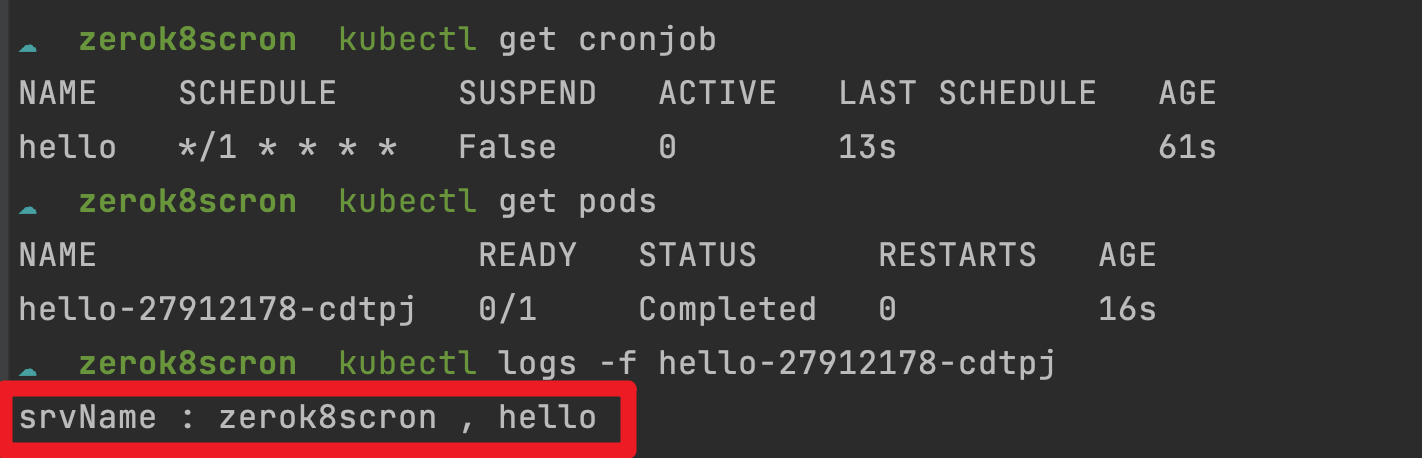
$ kubectl apply -f cronjob.yaml然后可以查看 cronjob 运行状态以及输出